


Design your deck in Figma.
Export to PowerPoint and more.
Add interactions and analytics, then share or export the same deck to Google Slides, Keynote, Canva, and PDF. Join 498,000+ Figma users saving 8+ hours a week.
10 free Pro trials • No credit card required • 30‑day money‑back guarantee





 Keep the deck in Figma instead of rebuilding it in PowerPoint.
 Add speaker notes, links, video — create interactive presentation experiences.
 Export to PowerPoint, Google Slides, PDF, or Keynote for handoff.
 Share web links with analytics — password-protected URLs with viewing insights.
 Keep your source deck private — share only the output your audience needs.
 Get help from a real person — customer support replies within 24 hours.

Perfect! It has honestly changed my business.

Used by teams at world-class companies







Read video transcript
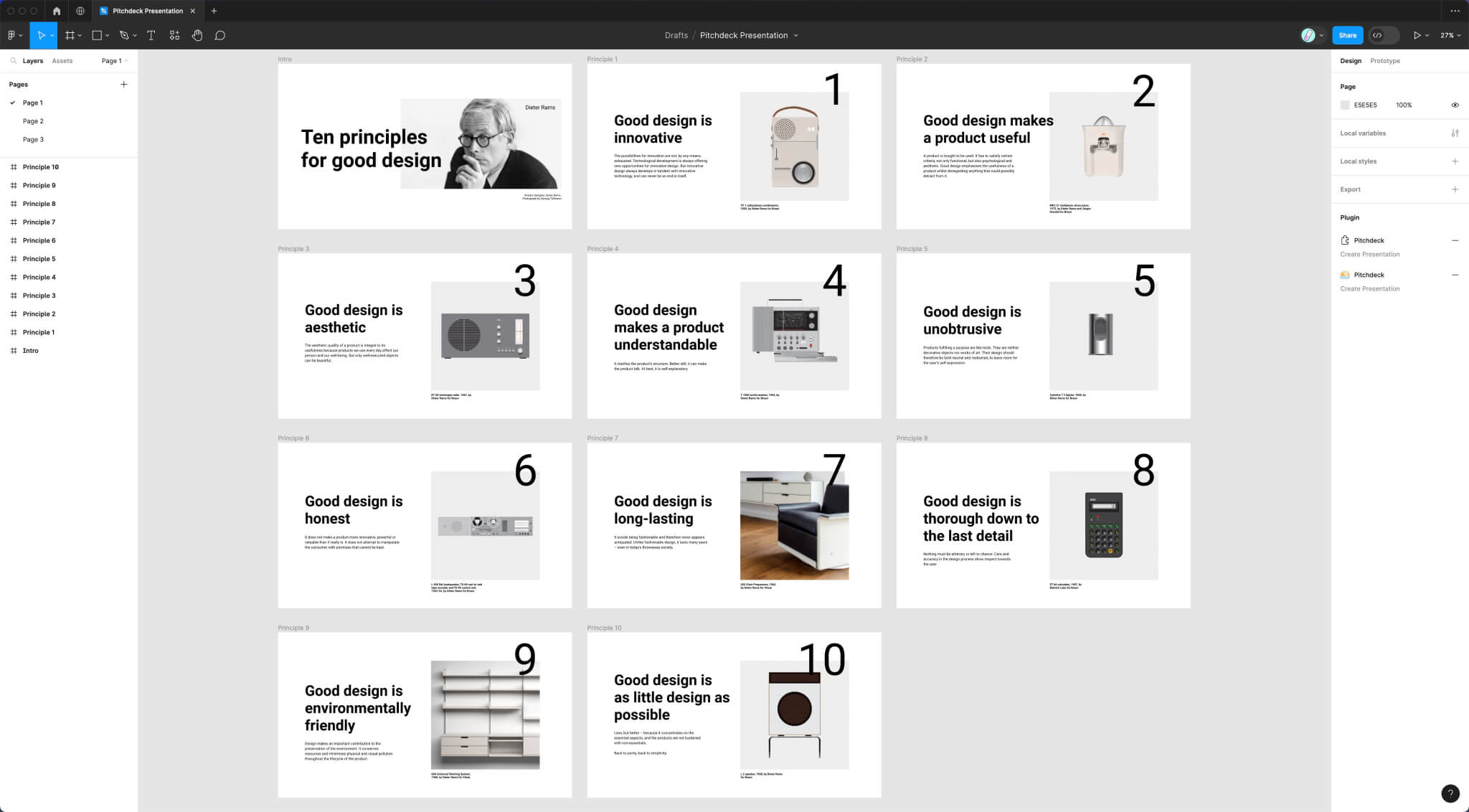
Build polished presentations inside Figma with an animation workflow that feels fast, visual, and much easier to iterate on. Add GIFs, videos, and embedded content to slide layers so your decks can do more than static bullet points and screenshots. Share presentation URLs in the browser, protect access when needed, and present from anywhere without rebuilding your deck in another tool. Build scrolling presentation pages that feel more like interactive stories, so viewers can explore at their own pace in the browser. See how people engage with your decks through built in analytics, and get better visibility into what content is actually being viewed. Export Figma slides to PowerPoint, Keynote, or Google Slides with editable text, so handoffs stay flexible in any presentation workflow. Generate presentation PDFs in seconds for email, Slack, and approvals, with optional password protection for safer review files. Move more smoothly between Figma, PowerPoint, Google Slides, and similar formats when teams or clients need different presentation outputs, without rebuilding the same deck from scratch for every handoff, review, or live presentation workflow. Run Pitchdeck in both classic Figma files and newer Figma Slides files, so your presentation workflow stays consistent everywhere. Turn Figma slides into interactive presentations, export to every format your team needs, and present with more confidence using Pitchdeck.
Generic templates not included*
(We know you’re a designer).
Design and animate your slides however you want, and Pitchdeck handles presenting, sharing, and exporting them.
*No rigid templates that fight your brand.
One deck. Every way your
audience needs to see it.
Present from Figma, share in the browser, import PowerPoint, or hand off editable slides to the tools your audience already uses.
Require Figma account to view
Share presentations with anyone
Limited export options
Export to PDF or PPTX files
No viewer analytics
Detailed built-in analytics
Animate and present from a clean, distraction-free interface.
Add smooth animations to any Figma slide layer in real time, directly inside Figma, using the Pitchdeck timeline. Select from dozens of premium presets, or craft your own custom animations.
Explore Figma slide animation
Add GIFs, video, and live embeds to any slide.
Simply paste a URL into Pitchdeck to embed GIFs, videos (.mp4, YouTube, Vimeo) and clickable links on any layer. You can also embed content from Figma, Canva, Loom, Lottie, Google Docs/Sheets/Slides, SoundCloud and Spotify.
Explore Media embeds in Figma presentationsShare password-protected slide decks in the browser.
Create a password-protected URL and present your Figma slides from any browser. You can also self-host the presentation as an HTML file on your own domain.
Explore Password-protected presentation linksShowcase longer pages or website mockups with scrollable slides.
Whether you're presenting website designs to a client, or a portfolio piece in a job interview — Pitchdeck automatically handles longer Figma slides.
Explore Scrollable Figma presentationsTrack every custom share link with built-in analytics.
See performance at a high level and per session; create custom URLs for different stakeholders to easily filter your metrics by specific viewers — all instantly exportable to a CSV file.
Explore Presentation analyticsHand off your Figma slides to PowerPoint, Keynote, Google Slides, or Canva.
Export editable presentation files for Microsoft PowerPoint, Google Slides, and Apple Keynote, or package your deck as automatically split PSD files for Canva. Keep designers in Figma while clients and marketing teams work in the tools they already use.
- PowerPoint
- Google Slides
- Keynote
- Canva
Export your slides from Figma to PDF.
Export your Figma slides to a single PDF deck in seconds, perfect for quickly sharing via email or Slack. Add optional password protection for securely sending confidential Figma slide decks under NDA.
Explore Figma presentation PDF exportTurn PowerPoint PPTX files into editable Figma slides.
Import PPTX files from PowerPoint, Google Slides, or Keynote into Figma or Figma Slides. Keep editing supported text, images, shapes, tables, and speaker notes instead of rebuilding the deck slide by slide.
- PowerPoint PPTX
- Editable text and images
- Shapes and tables
- Speaker notes
Use the Pitchdeck plugin in your Figma Slides files, too.
You can run the Pitchdeck plugin in either the main Figma app, or the newer dedicated Figma Slides app, where you can use and enjoy the best plugin features in both file types.
Explore Pitchdeck for Figma SlidesKeep the design in Figma.
Send the deck anywhere.
Create, animate, present, share, and export the same slide deck without rebuilding it in another presentation tool.
You just saved me hours of time! I think I love you!
Thanks so much, Adam!... saved me many, many hours of manual work.
Thank you so much for your help! Emailify is honestly a game changer.
Design the deck once.
Present it anywhere.
Try it for 30 days. Not getting value? We’ll refund you in full.
License Key, Emailed Instantly.
Upgrade your workflow in minutes — your license key arrives immediately.

Try It Risk-Free for 30 Days.
Get a full refund if you don’t see value within your first 30 days.

Cancel Anytime, Hassle-Free.
No contracts. No hidden fees — cancel anytime with a single click.
Select Billing Cycle
🔥 Save 14% when you pay yearly.


Need approval?
 Download PDF quote ↗
Free Trial
Try Pitchdeck Pro
$0Includes
10 Free Pro Trials

 1 UserEnough to test the Pro workflow yourself.
- Try All Pro FeaturesIncludes 10 full Pro trial runs.
- Limited FeaturesFree workflow stays available after trials.
- Self-Serve SupportHelp Docs for setup and troubleshooting.
- Unlimited Static PDF Exports
- No Credit Card RequiredInstall from Figma and start testing.

Free Trial
No Credit Card Required
Most Popular

Pitchdeck Pro
Figma Plugin License
$29 per monthSaving $49 yearly
$25Per User
Per Month
Export one deck to PowerPoint, Google Slides, PDF and Keynote30-day money-back guaranteeSupport within 24 hours
Perfect! It has honestly changed my business.
- 1 UserScale the license count before checkout.
- Access All FeaturesEverything in Pitchdeck Pro is unlocked.
- Customer Support IncludedWe'll resolve any issue within 24 hours.
- Unlimited Web Presentations
- Unlimited Web Analytics
- Unlimited PPTX Exports
- Unlimited CSV Chart Imports
- Unlimited PPTX Imports
- Unlimited Interactive PDFs
- Unlimited Spell Checking
- Billed YearlySave 14% and cancel anytime.
Using multiple plugins? See the Pro Bundle and save more than buying separate licenses.

Secure Checkout
All prices in USD (ex. Sales Tax)
Best Value

Pro Bundle
Every Hypermatic Plugin
$99 per monthSaving $189 yearly
$83Per User
Per Month
30-day money-back guaranteeSecure checkoutSupport within 24 hours
- 1 UserOne bundle seat per Figma user.
- One License For 12 PluginsEmailify, Bannerify, TinyImage and more.
- Customer Support IncludedOne support path for the full plugin stack.
- Save 70% with a Pro BundleLower than individual plugin licenses.
- Access All FeaturesFull Pro access in every included plugin.
- Billed YearlySave 15% and cancel anytime.
Secure Checkout
All prices in USD (ex. Sales Tax)
Need to convince your boss?
Personalize this message and get a fast “yes” for Pitchdeck. Fast, human support is included, and every purchase is covered by our 30-day refund policy.
Pitchdeck FAQ
Please check out the Pitchdeck Docs for more answers.

Can I try out Pitchdeck Pro?
Yes! 10 free trials of Pitchdeck Pro are included, then you can continue using the Free version of Pitchdeck forever, or upgrade to continue using all the extra Pro features.
What's the refund period for Pitchdeck?
We really want you to get value from using Pitchdeck! If you don't see value within the first 30 days, please contact us for a full refund.

Where can I read about security?
Pitchdeck is designed to be privacy and security focused — for details about security and how the plugin works, please visit security page on our documentation site.
What is Pitchdeck?
Pitchdeck turns Figma slide designs into browser presentations, PDFs, and editable deck formats.
Can Pitchdeck import PowerPoint files into Figma?
Yes. Pitchdeck can import PowerPoint (.pptx) files into Figma or Figma Slides with supported text, images, shapes, tables, and speaker notes as editable layers.
Is Pitchdeck a Figma plugin?
Yes. You create slides from Figma frames, then export them from the plugin.
Which Pitchdeck export fits best?
Use Web URL for browser presentations, deck formats for editing, and PDF for fixed sharing.
Can Pitchdeck help with Canva?
Yes. Pitchdeck exports can be a helpful starting point for Canva workflows.
Can Pitchdeck export animations?
Yes. Animations are supported in Web URL presentations; deck and PDF exports stay static.
Can Pitchdeck export editable decks?
Yes. PowerPoint, Keynote, and Google Slides exports are the best editable deck options.


Useful alongside Pitchdeck.
Add the next plugin only when the adjacent workflow becomes part of the job.